


Instabridge: WiFi Hotspot Map
4.241.43K Reviews
App Specs
- Version
- 26.8.17
- Updated On
- License
- Free
- Downloads
- 100,000,000+
- Developer
- Instabridge Sweden AB
- Categories
- Travel & Local
- Platform
- Android, iOS
Screenshots
 Analysis by AppCompare
Ever found yourself in a new city, desperately searching for a WiFi connection to save your dwindling mobile data? Well, let me introduce you to Instabridge: WiFi Hotspot Map. This app is like having a pocket-sized WiFi genie that grants your wish for internet access wherever you go. I've given it a spin, and here’s the lowdown on how it works and why you might want to give it a try.
That promise is most useful when I treat the app as a way to find an option, not as a replacement for a dependable mobile connection. A hotspot map can make the next step easier, but the network still has to be nearby, reachable and suitable for what I need to do. I’d keep mobile data available for directions or an urgent message rather than plan a whole day around an untested hotspot.
What’s the Deal with Instabridge?
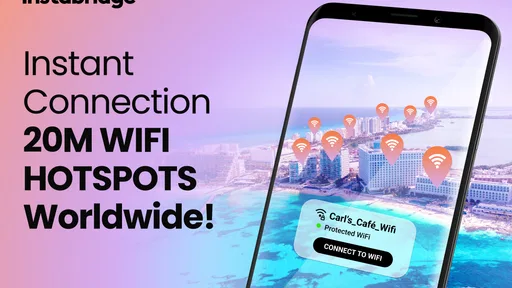
Picture this: you’re sipping coffee at a quaint little café, but the WiFi password is as elusive as the perfect espresso. With Instabridge, you can easily connect to nearby hotspots shared by a global community of users. The app essentially creates a map of accessible WiFi networks, so you can stay connected without the hassle of asking for passwords.
Guides and Analysis on Instabridge: WiFi Hotspot Map
Instabridge is a free travel and local app from Instabridge Sweden AB. It has a 4.2 average from around four million ratings, with over 100 million installs, so it is a widely used tool rather than a niche map. The app is rated Teen, and the current Android version is 22.2025.12.29.1718, with Android 6.0 as the minimum requirement. It has been available since September 6, 2012, and offers in-app purchases ranging from $0.99 to $94.99 per item. I’d consider those purchases separately from the basic idea of finding shared WiFi: free access to the app does not mean every optional feature or offer is necessarily free.
Setting It Up
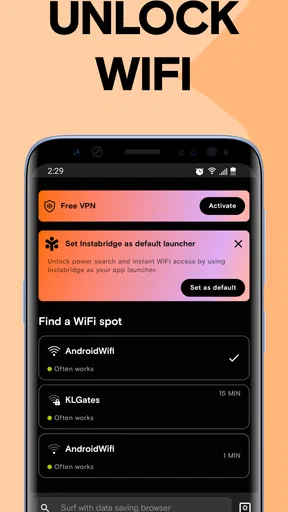
Getting started with Instabridge is a breeze. Download it from the app store, and you’re good to go. The interface is intuitive, with a map that highlights available networks. You can even see the connection strength, which is super handy when deciding where to perch yourself for a bit of digital work or play.
For a more useful first test, I’d check the map before leaving a place with reliable internet, then look for a hotspot near the destination rather than waiting until I’m stuck outside with a low battery. A marker is a lead, not a promise that the network will be open, active or fast enough at that exact moment. If I’m choosing between two nearby spots, I’d use the map to narrow the search and still be ready to ask staff whether their network is intended for customers.
Community-Powered Connectivity
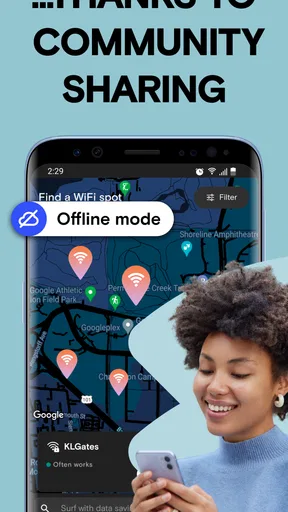
One of the coolest aspects of Instabridge is its community-driven approach. Users contribute to the database by sharing passwords and hotspots they’ve discovered. It’s like a WiFi treasure hunt, and everyone’s invited! Plus, you can contribute by adding hotspots you find, making it a win-win for everyone involved.
Worth Reading Before You Choose

QuizzLand Review: A Good Fit for Short Trivia Breaks, Not Every Player

Basketball Stars: Multiplayer Is Fast, but Can It Recover When Matches Go Wrong?

WEBTOON Turns Phone Updates Into a Better Reading Routine

Link to Windows Runs on Shared Habits, Not Social Feeds

How Alibaba.com Dominates the B2B Marketplace

Metro's Quiet Rise: Redefining Mobile Communication
That shared model is also the main trade-off. A community map can be especially helpful in places where many people have added useful information, but coverage and freshness can vary from one neighborhood to another. A listing that worked for someone earlier may no longer be usable, and a quiet area may have very few entries. I would not assume that a hotspot shown on the map has been recently checked simply because it appears there.
There is a practical courtesy involved, too: I’d use shared access in a way that respects the people and venues providing it. If I’m in a café, buying something and keeping my stay reasonable is better than treating the connection as an entitlement. And when I find a network that genuinely helps, contributing accurate information can make the map more useful for the next person, provided I’m comfortable sharing that information.
Seamless Connectivity
The app works pretty smoothly. Once you’re in range of a shared network, Instabridge attempts to connect automatically. It’s a bit like having a personal assistant who’s always on the lookout for free internet. While there’s no guarantee you’ll always find a connection, it significantly ups your chances, especially in urban areas.
In everyday use, I’d let automatic connection handle the convenient moments, but I would not rely on it as a substitute for checking what I’m joining. A strong signal indicator can help me choose where to sit, yet signal strength alone says nothing about whether a network is congested or whether it will handle a video call. For a quick message, map lookup or loading a page, a shared hotspot may be enough; for a meeting, large upload or time-sensitive task, a known connection or mobile data is the safer choice.
A realistic use is arriving in an unfamiliar city and needing to message a host after getting off public transport. I could open the map while I still have a connection, identify a nearby hotspot, and try it before using mobile data for more demanding tasks. If the network does not work, I still have a clear next move: use my data, ask at a nearby business, or continue to a place I already know. The value is having another option, not having to gamble on one.
Data Usage & Privacy
I know what you're thinking—what about privacy? It’s a valid concern. Instabridge uses encryption to safeguard your data. However, as with any public WiFi, it’s smart to avoid accessing sensitive information unless you’re on a trusted network.
I’d keep that caution practical rather than assume that a map makes every connection safe. For everyday browsing, I still look for the network name I expect and avoid entering sensitive details on a connection I do not trust. If I need to handle banking, work accounts or private documents, mobile data or a network I recognize is a better choice. The app’s broader store summary also mentions eSIM, Caller ID, Dialer, Home Screen Launcher and VPN, but I would assess those as distinct tools rather than assume that finding a hotspot automatically makes every aspect of a connection private.
Another small but useful habit is to switch back to a trusted connection when I’m done. It prevents me from casually continuing sensitive tasks on a public network just because the phone connected without fuss. I would also consider whether I want to contribute hotspot details before sharing them; community participation helps the map, but users should make that choice deliberately.
Where It Fits—and Where It Doesn’t
If you’re a traveler, a digital nomad, or just someone who hates parting with their precious mobile data, this app can be a game-changer. It’s a nifty tool that makes accessing the internet while on the go much easier. And for those moments when you simply must upload that Instagram-worthy sunset, Instabridge might just save the day.
I see it as a particularly good fit for people who move around built-up areas, take occasional trips, or want a backup when their data allowance is tight. It can also help someone scout for a place to pause and get online without walking into several businesses just to ask about WiFi. The best results come when I’m flexible about where I connect and what I do once online.
It is less suitable for someone who needs guaranteed coverage in rural areas, has a strict requirement for a stable work connection, or does not want to use community-shared network details. In those situations, a mobile plan, a personal hotspot or WiFi supplied by a known venue is usually a more predictable choice. Compared with searching manually in phone settings or asking every business, the map can save time by showing possible nearby options; compared with a carrier connection, it cannot offer the same expectation of continuity. Those are different jobs, so I would use Instabridge as a supplement rather than a direct replacement.
One question I’d ask before a trip is whether the app can make my whole journey work offline. Its store summary describes an offline WiFi hotspot finder, which is useful for planning around limited connectivity, but I would still prepare essential travel details separately. A map of potential access points is not the same as offline navigation, tickets or saved booking information. I’d download or keep those essentials accessible before setting out instead of assuming a hotspot will appear when needed.
Another question is whether I should pay for an optional purchase. Since the app is free to download and includes in-app purchases, I’d first try the basic hotspot-finding workflow and only consider a purchase if I understand exactly what it adds and expect to use it. The listed purchase range is broad, so I would check the current in-app terms carefully rather than treating the highest or lowest amount as the price of the core app.
For a family or a group, I would not assume that one person’s success guarantees the same experience for everyone. Each device still needs a workable connection, and a shared public network may be slow when busy. If several people need reliable service at the same time, a personal hotspot or a venue’s confirmed WiFi may be easier to coordinate. Instabridge is strongest when the goal is to discover another possible connection, not when the group needs a service guarantee.
What the Version Tells Me—and What to Watch
The app’s long availability and current version show that Instabridge remains an actively versioned product, but a version number alone does not tell me which feature changed or how a specific update affects my routine. I would install updates through the normal app-store process and check the change notes there when I want to know what has changed. I would not assume that an update has improved hotspot coverage in my neighborhood without testing the map itself.
For existing users, the useful test is simple: after an update, check whether the map still helps you find viable networks in the places you actually visit, and whether automatic connection behaves as expected. For a new user, I’d judge it over several ordinary outings instead of one lucky connection. Local usefulness matters more than a broad claim about global reach, because your commute, campus or travel route is where the app either earns a place or does not.
What I’d watch going forward is the quality of nearby entries, how clearly the app distinguishes a promising listing from a dependable connection, and whether the optional tools remain easy to understand alongside hotspot discovery. Those are the things that would affect my confidence and daily use. Even with a large user base, community maps are only as practical as the information available where you are, so I’d keep a backup plan and let actual results guide how much I rely on it.
In conclusion, Instabridge: WiFi Hotspot Map is more than just an app—it's your ticket to staying connected without the stress of burning through your data plan. Give it a go, and you might find it becomes a staple on your home screen, ready to jump into action whenever you need it.
Pros
- Easy to use interface for all users.
- Large database of WiFi hotspots worldwide.
- Offline maps for data-free access.
- Community-driven updates enhance accuracy.
- Saves on mobile data expenses.
Cons
- Some hotspots may have outdated passwords.
- Requires location access for full functionality.
- Ads can be intrusive for free users.
- Limited features without premium upgrade.
- Occasional connectivity issues in remote areas.
FAQs for Instabridge: WiFi Hotspot Map
What is Instabridge and how does it work?
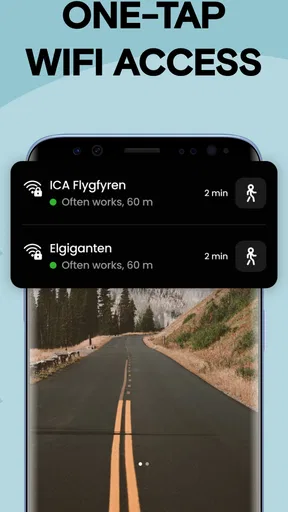
Instabridge is a WiFi hotspot map app that helps users find free and reliable WiFi connections worldwide. It functions by crowd-sourcing WiFi passwords and locations, making it easier to connect to the internet without using mobile data. The app provides a map view where users can see nearby hotspots and connect with a single tap.
Is Instabridge safe to use for connecting to public WiFi?
Instabridge connects users to public WiFi networks, which can pose security risks. While the app itself is secure, users should exercise caution when using public WiFi by avoiding sensitive transactions and using a VPN for added security. Instabridge facilitates connections but doesn't control the security of each hotspot.
Does Instabridge require an internet connection to find hotspots?
Instabridge requires an initial internet connection to download maps and hotspot data. Once downloaded, users can access this information offline, allowing them to locate WiFi hotspots without needing an active internet connection. This feature is particularly useful when traveling or in areas with limited connectivity.
Can I contribute WiFi passwords to Instabridge?
Yes, Instabridge encourages users to share WiFi passwords to expand its database. Users can easily add new hotspots and update existing ones by providing accurate passwords and location details. This community-driven approach helps improve the app's coverage and accuracy, benefiting all users.
Is Instabridge available for both Android and iOS devices?
Instabridge is available for download on both Android and iOS platforms, ensuring compatibility with a wide range of devices. Users can find the app on the Google Play Store and Apple App Store, making it accessible for most smartphone and tablet users looking to save on mobile data usage.


